
Develop Visual Assets: A Step-by-Step Guide for Marketing

Visual inconsistency is one of the most expensive problems a brand can have, and most marketing teams don’t realize the damage until a campaign has already launched. In technology and automotive advertising, where every image carries enormous weight in shaping buyer confidence, a single mismatched color palette or a vehicle photo with subtle distortion can quietly undermine trust. The good news is that structured visual asset development eliminates most of these risks before they become costly mistakes. This guide walks you through every stage of that process, from auditing what you already have to measuring real campaign performance.
Table of Contents
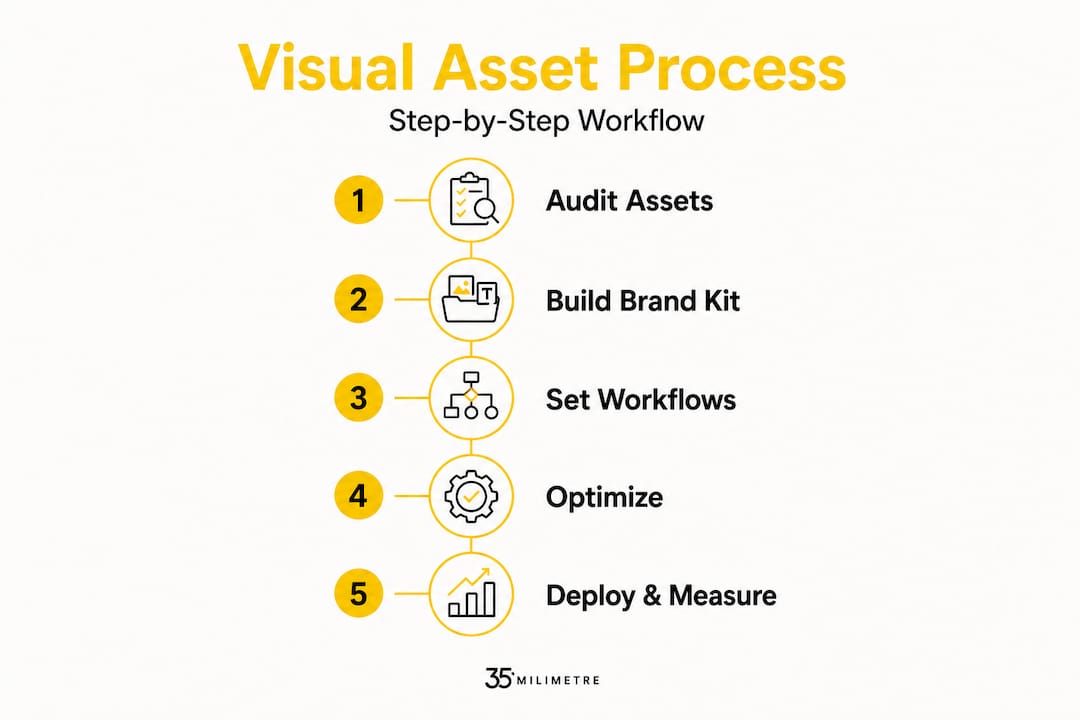
- Gather requirements and audit your existing assets
- Build a comprehensive brand kit and guidelines
- Set up workflows and asset management systems
- Optimize visual assets for accessibility and industry standards
- Deploy and measure asset performance
- Expert insights: Human touch vs. AI scale in asset development
- Take your visual assets to the next level
- Frequently asked questions
Key Takeaways
| Point | Details |
|---|---|
| Consistent brand kit | A thorough brand kit sets the foundation for visual cohesion and impact across all platforms. |
| Structured workflows | Implementing clear production and management workflows prevents bottlenecks and keeps assets organized. |
| Accessibility standards | Meeting WCAG AA contrast ratios is critical for both legal compliance and audience reach. |
| Automotive guidelines | Use high-quality, distortion-free imagery and match industry standards for optimal results. |
| Human vs. AI visuals | Handcrafted assets deliver more trust for critical ads, while AI provides scalable solutions when overseen properly. |
Gather requirements and audit your existing assets
Having set the stage for why consistency matters, it’s time to examine your current assets and requirements before building anything new.
An asset audit sounds procedural, but it is genuinely one of the highest-leverage activities a marketing team can run. The reason is simple: most organizations are sitting on a mixed inventory of outdated logos, conflicting image styles, and templates that were never formally approved. When those assets circulate unchecked, brand drift accumulates quietly. The practice of auditing existing assets and tokenizing designs into reusable elements is foundational to any scalable brand system, and skipping it means you are building on an unstable base.
A solid audit covers every visual touchpoint your brand uses. That means logos in all approved formats and color variants, photography assets categorized by campaign and date, motion graphics templates, presentation decks, social media templates, and printed collateral. Beyond simply cataloging these files, you want to flag anything that falls outside your current guidelines, note where duplicates or near-duplicates exist, and identify gaps where you need entirely new assets. The goal is a clear picture of what is working, what needs updating, and what should be retired entirely.
Here is what a thorough audit should capture across each asset category:
- Logos: All versions (full color, monochrome, reversed), approved file formats (SVG, PNG, EPS), and minimum size rules
- Color swatches: Primary and secondary palettes with confirmed HEX, RGB, and CMYK values
- Typography: Licensed font families, weights, and hierarchy rules for digital versus print
- Photography styles: Approved lighting, composition, and retouching standards per channel
- Templates: Status (active, outdated, deprecated) and the responsible team member for each
- Image resolution and aspect ratios: Per-channel specs for web, social, display, and video
A well-structured audit also helps you accelerate content development cycles because creative teams are not hunting for approved files or second-guessing which logo version to use. This reduction in friction compounds over time, especially on large campaigns where dozens of asset variations are in play simultaneously.
Pro Tip: Schedule quarterly audits on your team calendar rather than treating them as reactive tasks. A quarterly cadence catches brand drift early and keeps guidelines in sync with evolving campaign needs.
| Asset category | What to review | Flag for update if… |
|---|---|---|
| Logos | Formats, variants, usage rights | Missing SVG or reversed version |
| Color palette | HEX, RGB, CMYK values | Values conflict across brand docs |
| Photography | Style, resolution, licensing | Older than two campaign cycles |
| Templates | Version, channel fit | Predates current brand guidelines |
| Typography | Font licenses, hierarchy | Unlicensed or inconsistently applied |
You can find a deeper breakdown of what belongs in your toolkit by reviewing the essential design assets that high-performing agencies rely on. It is a useful reference when building your audit checklist from scratch.
Build a comprehensive brand kit and guidelines
Once you’ve assessed your assets, the next step is to build or refine your brand kit and guidelines so that every creative decision has a clear reference point.
A brand kit is not simply a style guide PDF that lives on a shared drive. It is a living system that ensures consistency across touchpoints by specifying logos, color palettes, fonts, spacing, and image styles in enough detail that any designer, agency, or production partner can work without ambiguity. For technology and automotive brands, this specificity is non-negotiable. A smartphone campaign running across 12 regional markets cannot afford mismatched gradient treatments or inconsistent product photography angles.
When building your brand kit, you need to think in two tiers: the minimum viable set that gets you to consistency, and the advanced system that gives your creative teams the flexibility to scale without sacrificing brand integrity. Our visual branding guide outlines how to think about differentiation through visual language, which is directly relevant here.
| Element | Minimal brand kit | Advanced brand kit |
|---|---|---|
| Logo | Primary version only | All variants, clearspace rules, misuse examples |
| Color | Primary palette | Primary, secondary, tertiary, accessibility-checked |
| Typography | Font family and weight | Full hierarchy, size scale, line height, web fallbacks |
| Image style | General direction | Lighting specs, retouching standards, approved subjects |
| Spacing | Basic grid | Component-level spacing tokens, responsive rules |
| Iconography | Optional | Custom icon set with usage rules |
The advanced tier is especially important for automotive brands, where vehicle photography must adhere to very specific standards around angle, lighting, and color accuracy. A brand kit at this level functions less like a document and more like a component library.
Pro Tip: Build your brand kit using shared design tokens (reusable variables for color, spacing, and type) so that updates to core brand values cascade automatically across templates and components, rather than requiring manual edits across hundreds of files.
Set up workflows and asset management systems
Your brand kit needs smooth workflows and asset management to truly scale and maintain consistency across teams, agencies, and production partners.

Creative workflows that lack structure create bottlenecks, version confusion, and costly rework. The structured approach to creative asset management runs from ideation to approval, using project tracking and version control to keep production on schedule. Without this, even teams with excellent brand guidelines produce inconsistent results because the review and approval process is informal or unpredictable.
A well-designed creative workflow follows these stages:
- Briefing: Define campaign objectives, channel requirements, and asset specifications before any design work begins
- Concept development: Generate initial directions aligned with brand guidelines and campaign strategy
- Internal review: Creative lead assesses alignment with brand kit and flags deviations
- Revision cycles: Structured feedback rounds with clear versioning (V1, V2, final)
- Stakeholder approval: Formal sign-off from brand manager and relevant department heads
- Asset preparation: Exporting files in all required formats and resolutions per channel
- DAM upload: Filing approved assets into the Digital Asset Management system with accurate metadata and tags
- Archive: Retiring superseded versions with clear labels to prevent accidental reuse
The role of a Digital Asset Management system (DAM) in this flow is substantial. A DAM provides centralized storage, metadata tagging, and version control with role-based governance, which means the right team members access the right files at the right time. It also eliminates one of the most common (and embarrassing) production errors: a campaign going live with an outdated asset because someone pulled a file from their local folder instead of the approved library.
A single product launch in the automotive sector can generate several hundred visual files, each requiring different formats, resolutions, and aspect ratios per channel. Without a DAM and a structured workflow, that volume becomes unmanageable almost immediately.
For teams building or improving their production process, our piece on developing a high-efficiency workflow for ad agency visuals provides a practical framework you can adapt to your own setup.
Pro Tip: Integrate your creative project management tool directly with your DAM so that approved files are automatically filed with the correct metadata tags. This removes a manual step that is frequently skipped under deadline pressure.
Optimize visual assets for accessibility and industry standards
Now, ensure your assets meet critical accessibility and industry benchmarks to maximize impact and reduce legal risk in your campaigns.
Accessibility in visual assets is not optional. For technology brands advertising digital products, and for automotive brands running display and video campaigns, non-compliant visuals create legal exposure and alienate a significant portion of your audience. The WCAG AA standard specifies minimum contrast ratios of 4.5:1 for normal text and 3:1 for large text and user interface components. These ratios must be validated against your brand palette during the kit development phase, not as an afterthought when assets are already in production.
Minimum contrast ratio for text below 18pt/24px: 4.5:1. This is a firm threshold, not a suggestion. Failing this check in brand palette development forces late-stage redesigns that delay launches and increase production costs.
Automotive visual standards carry their own specific requirements. High-quality vehicle imagery must be free of distortions, alterations, clutter, or non-brand elements. Any CGI or post-production modification must be disclosed. This is not merely an industry preference: it reflects consumer trust norms in a category where product integrity is directly tied to purchase confidence.
Key requirements for technology and automotive visual assets include:
- Color contrast: All text and UI overlay elements must meet WCAG AA minimums against background colors
- Alt text compatibility: Images destined for digital channels need clear descriptive metadata for screen reader compliance
- Vehicle imagery: No distortions, no removal of required legal disclosures, no non-brand environmental elements
- CGI disclosure: Any computer-generated or AI-enhanced vehicle image must be labeled as such in campaign materials
- Resolution standards: Minimum 300 DPI for print assets, platform-specific pixel dimensions for digital and social placements
- File format compliance: Correct formats per platform (JPEG for photography, PNG for transparency layers, MP4 for video)
Our resources on post-production tips for brand videos and on AI advertising strategies address both the technical execution and the governance considerations that matter most in these sectors.
Deploy and measure asset performance
With assets developed and standards applied, it’s time to launch and test their effectiveness in live campaign environments.
Deployment without a measurement plan is a missed opportunity. Asset performance data tells you which visuals are driving engagement and conversion, and which need to be replaced in the next production cycle. For automotive advertisers using Performance Max campaigns, PMAX best practices recommend 15 to 20 high-quality images per asset group, including vehicle-specific installation shots, to achieve optimal performance. That is a meaningful volume commitment, and it underlines why a structured workflow and DAM are essential rather than optional.
Deployment steps for asset campaigns include:
- Pre-launch QA: Verify every asset format, resolution, and metadata tag against channel specs
- Platform upload: Load assets into campaign management systems with correct naming conventions
- A/B structuring: Assign visual variants to test groups to isolate performance differences
- Tracking setup: Confirm UTM parameters, pixel fires, and conversion events before go-live
- Launch and monitor: Track impressions, click-through rate, and conversion within the first 48 hours
| Asset type | Recommended volume | Key performance metric |
|---|---|---|
| Static images (PMAX auto) | 15-20 per asset group | Click-through rate, conversion rate |
| Video assets | 3-5 per campaign | View-through rate, completion rate |
| Social display banners | 6-10 size variants | Engagement rate, cost per click |
| Product/tech renders | 4-6 angles per product | Time on page, add-to-cart rate |
Connecting your deployment data back to your visual content creation strategies and reviewing which ad agency visuals performed best will help you refine your next production cycle with real evidence rather than assumptions.
Expert insights: Human touch vs. AI scale in asset development
After two decades of working across technology and automotive campaigns, the most consistent lesson we carry is this: speed does not substitute for craft, and at scale, both are required simultaneously.
AI-generated imagery has become genuinely impressive in the past two years. It can produce background environments, product visualizations, and lifestyle composites at a fraction of the time and cost of traditional photography. For campaigns that need 40 asset variants across 10 markets in a week, AI is not just useful; it is the only realistic option. But there is a ceiling, and we run into it regularly.
Handcrafted visuals consistently outperform AI-generated images in trust and conversion for high-stakes advertising. The reason is subtle but real: human-crafted compositing and retouching carries a texture of intentionality that audiences perceive, even if they cannot name it. A vehicle photograph with expert color grading and precise reflection work signals quality in a way that a generative image, however polished, often does not quite match. This matters enormously in automotive advertising, where a buyer is considering a $40,000 to $80,000 purchase.
The more honest insight, though, is that the divide between human and AI work is narrowing faster than most professionals expected. What we recommend now is a layered approach: use AI to generate variations, environments, and rough composites quickly, then route the highest-stakes assets through professional post-production for final polish and accuracy. This keeps production velocity high without sacrificing the visual integrity that drives real conversions. The visual strategies for impact that consistently work are the ones that treat AI as a production tool within a governed workflow, not as a replacement for creative judgment.
Quarterly audits, as we noted earlier, are not just a brand housekeeping task. They are how you catch AI-generated assets that have drifted from brand standards and ensure that every visual in circulation still meets accessibility and industry requirements. Skipping them is how brand equity erodes quietly, one slightly-off image at a time.
Take your visual assets to the next level
Developing a structured visual asset system is one thing. Executing it at the quality level that premium technology and automotive brands require is another challenge entirely.
At 35milimetre, we specialize in exactly that gap between strategy and execution. Our post-production team handles everything from precision retouching and CGI compositing to color grading and AI-enhanced imagery, working alongside ad agencies and brand managers who need assets that genuinely stand out. If you are ready to move from a solid brand kit to truly exceptional professional retouching services and campaign-ready visuals, we would love to show you what that looks like in practice. Reach out to discuss your next campaign.
Frequently asked questions
What does a brand kit include for maximum consistency?
A brand kit typically includes logos, color palettes, fonts, spacing, and image styles, ensuring consistent visuals across every touchpoint from digital ads to print collateral.
How often should brand assets be audited?
Quarterly audits are the recommended cadence to prevent brand drift and keep component libraries and visual guidelines accurate as campaigns evolve.
What are the key accessibility requirements for visual assets?
A minimum contrast ratio of 4.5:1 is required for regular text, and 3:1 applies to larger copy and UI elements under the WCAG AA standard.
How many images are recommended for automotive visual campaigns?
PMAX auto campaigns perform best with 15 to 20 high-quality images per asset group, alongside 3 to 5 video assets.
Can AI-generated visuals be used in high-stakes advertising?
Handcrafted visuals outperform AI in trust and conversion for high-stakes campaigns, but AI works effectively for scaling volume when governed within a structured production workflow.
