
What Is 3D Rendering? A Clear Visual Guide

3D rendering is one of those terms that gets thrown around constantly in design, film, advertising, and architecture, yet most people only have a vague sense of what it actually means. At its core, what is 3D rendering? It is the computer process of converting a digital 3D scene into a 2D image or animation viewed from a specific camera position. Not the modeling stage. Not the texturing stage. The final step where math, light simulation, and artistic decisions collapse into a single frame you can actually see on a screen or print.
Table of Contents
- Key Takeaways
- What is 3D rendering: definition, process, and output
- Core rendering techniques: ray tracing vs rasterization
- Where 3D rendering is used across industries
- Emerging trends: neural rendering and AI
- How to apply 3D rendering in your creative work
- My take: rendering knowledge is still your competitive edge
- Bring your 3D renders to the next level
- FAQ
Key Takeaways
| Point | Details |
|---|---|
| Rendering is the final output step | It converts a complete 3D scene into a 2D image, not a modeling or texturing task. |
| Two core techniques drive the field | Ray tracing prioritizes realism; rasterization prioritizes speed for real-time applications. |
| Lighting matters more than geometry | Material and lighting setup affects photorealism far more than raw polygon count. |
| Neural rendering is reshaping pipelines | AI-driven rendering is beginning to replace handcrafted physics formulas in production workflows. |
| Application determines the right method | Architecture, film, games, and product advertising each demand different rendering approaches and software. |
What is 3D rendering: definition, process, and output
Think of a 3D scene as a stage. You have actors (3D models), props (objects with materials and textures), lighting rigs, and a camera pointed at a specific angle. Rendering is what happens when the director calls “action” and the camera captures that moment as a finished photograph. The render engine is the camera and the entire film crew rolled into one.
Render engines compute the image by simulating how light interacts with surfaces and materials, producing outputs that range from photorealistic product shots to stylized cel-shaded animations. Every pixel in the final image is the result of calculations involving geometry, material properties, light sources, and the camera’s field of view.
The 3D rendering process breaks down into a few core elements you need to understand before anything else makes sense:
- 3D models: The geometric meshes that define the shape of objects in the scene.
- Materials and textures: Surface data that tells the renderer how an object reflects, absorbs, or scatters light.
- Lighting: The position, color, and intensity of light sources that determine mood, shadow, and realism.
- Camera: The virtual viewpoint that frames the final image, including focal length and depth of field.
- Render engine: The software that processes all of the above and outputs a final image or frame sequence.
Pro Tip: When you are learning the 3D rendering process, focus on getting your lighting and materials right before worrying about model complexity. Lighting and material responses) affect photorealism far more than polygon count.
The output can be a single still image for product advertising, a sequence of frames for animation, or a real-time interactive view inside a game engine. That distinction between still, animated, and interactive is where the different types of 3D rendering begin to diverge in both technique and technology.
Core rendering techniques: ray tracing vs rasterization
This is where most beginners get lost, and where most oversimplified explanations fail. The two dominant methods behind how 3D rendering works are ray tracing and rasterization, and they represent a fundamental tradeoff between realism and speed.
How ray tracing works
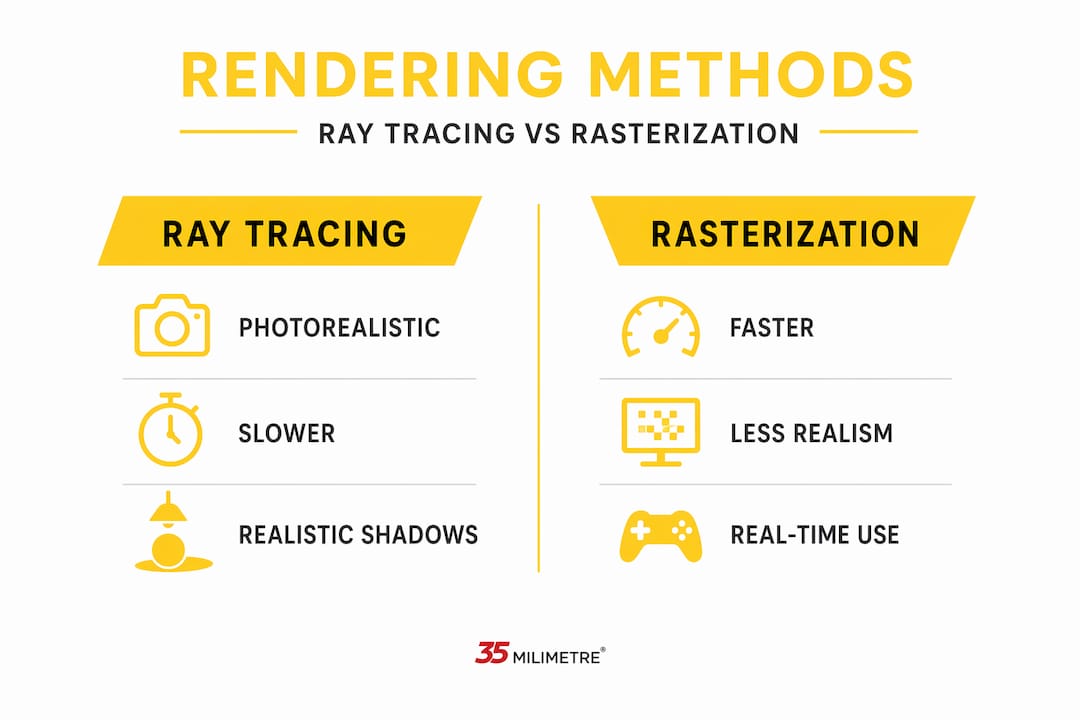
Ray tracing simulates the physical path of light. The engine fires rays from the camera into the scene, traces them as they bounce off surfaces, pass through glass, scatter through fog, and eventually reach a light source or exit the scene. Major rendering techniques like ray tracing trace rays of light to achieve realism, while rasterization projects meshes to pixels for speed. The quality that comes from ray tracing is visually unmistakable: accurate soft shadows, true reflections, caustics on a water surface, subsurface scattering in human skin.
The physics behind this process is described by the rendering equation, which models outgoing radiance as emitted plus reflected light based on incoming light, surface properties, and angles. Solving this equation accurately for every pixel is computationally expensive, which is why offline rendering can take hours per frame) to achieve photorealism in film and advertising contexts.
How rasterization works
Rasterization takes a different approach. It projects each 3D object onto the 2D screen plane by converting geometry into pixels directly, then applies shading approximations to simulate lighting. It does not trace light paths accurately, but it is extraordinarily fast. Real-time rendering achieves frames in milliseconds), which is why game engines rely on rasterization to render interactive experiences at 60 frames per second or higher.
| Feature | Ray Tracing | Rasterization |
|---|---|---|
| Realism | Very high | Moderate |
| Render speed | Slow (minutes to hours per frame) | Fast (milliseconds per frame) |
| Primary use | Film, advertising, architecture | Games, real-time apps, previews |
| Light accuracy | Physically accurate | Approximated with tricks |
| Hardware demand | High (CPU or GPU render farms) | Lower (standard gaming GPU) |
Pro Tip: Many modern workflows use both methods together. Use rasterization for fast previews during scene composition, then switch to a ray tracing engine for the final output. This saves hours on complex projects.
The choice between these techniques is not about which is better in absolute terms. It is about matching the method to the project’s requirements for quality, interactivity, and deadline.
Where 3D rendering is used across industries
3D rendering is widely used in architecture, product design, film, TV, video games, and visualization) to produce final images complete with shading, textures, and effects like motion blur and depth of field. But what that looks like in practice differs significantly by industry.

In architecture and real estate, rendering lets designers present buildings before a single brick is laid. Clients can walk through photorealistic visualizations of interiors, evaluate material choices, and request changes without costly physical mockups.
In product design and e-commerce, brands use 3D renders to produce marketplace-ready imagery for products that may not even exist in physical form yet. A single 3D model can generate dozens of colorways, angles, and lifestyle compositions without scheduling a photo shoot. The efficiency is real, and the visual quality can match or exceed traditional photography. For a deeper look at how this plays out creatively, the breakdown of 3D artists in advertising is worth reading.
In film and television VFX, rendering is what transforms digital assets into the finished frames audiences watch. Creatures, environments, and effects that would be impossible to capture practically are modeled, rigged, animated, and then rendered through production pipelines that may involve thousands of computing cores working in parallel.
In video games, the rendering pipeline runs in real time. Every frame the player sees is rendered live by the game engine, which is why the quality of shadows, reflections, and ambient lighting in games has been a decades-long arms race between hardware capability and visual ambition.
In advertising and branded content, rendering gives creative directors control over every element of an image. Light angle, shadow softness, material finish, and camera position are all adjustable after the shot is “taken,” something physical photography cannot offer. Studios that understand both the artistry and the technical side of rendering, as explored in this creative director’s visual guide, can deliver results that stand apart.
Emerging trends: neural rendering and AI
The rendering field is undergoing a shift that is easy to underestimate if you are focused on learning traditional tools. Neural rendering uses deep learning to replicate or replace traditional rendering pipelines without relying on explicit physics-based computations.
The most notable recent development is RenderFormer, a fully machine-learning-driven architecture from Microsoft Research that supports arbitrary 3D inputs and global illumination without the handcrafted formulas that traditional render engines depend on. Here is why that matters:
- End-to-end training: The entire rendering pipeline is learned from data, not programmed rule by rule. This opens possibilities for task-specific optimization that traditional methods cannot easily achieve.
- Global illumination without sampling: Neural methods can approximate complex light interactions that would normally require thousands of ray samples per pixel to resolve cleanly.
- Speed potential: Once trained, neural models can render results significantly faster than path tracing, at least for the scene types they were trained on.
- Generalization challenges: Current neural rendering methods still struggle with scenes outside their training distribution, meaning they are not yet universal replacements for physics-based engines.
Neural rendering shows promise to reshape rendering by eliminating handcrafted physics formulas in favor of learned models, though current methods face challenges in versatility. — Microsoft Research
The role of AI in creative studios is expanding fast, and understanding where neural rendering fits in the production stack is quickly becoming a practical skill, not just an academic curiosity.
How to apply 3D rendering in your creative work
Knowing what 3D rendering is and knowing how to use 3D rendering effectively are two different things. If you are starting out or refining your workflow, the following areas deserve your focused attention:
- 3D modeling fundamentals: Clean geometry is the foundation. You do not need hyper-dense meshes, but you do need topology that deforms correctly and holds up under render lighting.
- Material creation: Learn physically based rendering (PBR) workflows. PBR materials define roughness, metalness, and albedo in ways that behave consistently across different lighting environments.
- Lighting setup: Three-point lighting is a starting framework, but studying natural light and HDRI-based illumination will teach you more about photorealism than any tutorial series.
- Render engine selection: Different software serves different needs. Path tracers like those used in offline production deliver high realism. Real-time engines offer speed and interactivity. Match the tool to the output you need.
- Quality vs. speed balance: Sampling strategies and noise control) strongly affect output quality and render speed even with identical scene setups. Learning to denoise effectively is one of the highest-leverage skills in production rendering.
Pro Tip: If you are preparing assets for both offline and real-time pipelines, dual pipeline asset preparation) requires different materials, shader setups, and texture optimizations tailored to each method. Plan for this early in the asset creation stage, not at the end.
Starting with one render engine and mastering it deeply will serve you better than sampling five tools at surface level. Understand the renderer’s core behavior, then learn what it cannot do. That gap is where you grow.
My take: rendering knowledge is still your competitive edge
I’ve spent years working across 3D production workflows, and the one thing I keep coming back to is this: the teams that understand rendering at a fundamental level are the ones that produce work other studios cannot easily replicate.
There is a temptation, especially now with AI-assisted tools and automated pipelines, to treat rendering as a black box. Press render, wait, deliver. But when a client asks why the shadows look wrong, or why the product finish does not match the brief, you need to know whether the problem is in the material setup, the light bounces, or the render settings. That diagnosis requires foundational knowledge, not just software familiarity.
I’ve also seen firsthand that the balance between realism and interactivity is shifting. Neural rendering and AI-accelerated workflows are real, and they are already changing how studios approach production. But they are tools, not replacements for craft. The artists who will thrive are the ones who understand both the traditional physics-based rendering pipeline and where AI-driven methods offer genuine advantages.
My honest advice: learn rendering deeply, experiment relentlessly, and never let a tool think for you when the client brief demands something specific.
— 35mm
Bring your 3D renders to the next level

At 35milimetre, we have spent over two decades refining the post-production side of visual production, including compositing, color grading, and retouching that transforms raw 3D renders into polished, brand-ready imagery. A technically correct render is only the starting point. What makes a visual stand out in advertising, e-commerce, or branded content is the layer of craft that comes after: selective color work, shadow integration, material refinement, and the kind of attention to detail that only comes from experience.
Whether you are working with product shots, architectural visualizations, or CGI composites for major campaigns, our professional post-production services cover the full pipeline from rendered asset to final deliverable. We work with ad agencies, photographers, and brands who need imagery that goes beyond technically acceptable and into genuinely compelling. If your project involves 3D rendering and needs a team that understands both the creative and technical side of finishing that work, we would be glad to talk.
FAQ
What is 3D rendering in simple terms?
3D rendering is the process of converting a digital 3D scene into a flat 2D image or animation by simulating how light interacts with objects, materials, and surfaces. The result is the finished visual you see on screen or in print.
What are the main types of 3D rendering?
The two primary types are ray tracing, which simulates light paths for photorealistic results, and rasterization, which projects geometry quickly for real-time applications like video games. Many pipelines combine both methods depending on the output requirements.
How long does 3D rendering take?
It depends entirely on the method and scene complexity. Real-time rasterization renders frames in milliseconds. Offline ray tracing for high-end film or advertising work can take minutes to hours per frame, especially for scenes with complex lighting and high-resolution outputs.
What software is used for 3D rendering?
Render engines vary by application. Production studios use path-tracing engines for photorealistic offline work, while game developers rely on real-time engines for interactive rendering. The right choice depends on your project’s quality needs, deadline, and delivery format.
How is 3D rendering different from 3D modeling?
3D modeling is the process of building the geometry and structure of objects in a digital scene. Rendering is what happens after modeling, texturing, and lighting are complete. It is the final step that converts all of that scene data into a viewable image.
