
Industry Terms in Post-Production: A Pro's Guide

Misreading a single term in a post-production brief can send an entire team in the wrong direction for days. Whether you’re a media student learning the ropes, a filmmaker bridging creative and technical worlds, or a seasoned editor who just encountered an unfamiliar acronym, knowing your industry terms in post-production is not optional. It is the shared language that keeps projects moving. This guide breaks down the terminology that matters most, organized by workflow stage, so you can use each term correctly, communicate with confidence, and avoid the costly miscommunications that derail otherwise solid productions.
Table of Contents
- Key Takeaways
- Core industry terms in post-production workflow stages
- Film editing and VFX terms you need to know
- Audio post-production terminology explained
- On-set VFX data terminology and emerging workflows
- How terminology mastery improves real workflows
- My take on how post-production language is changing
- Work with a team that speaks the language
- FAQ
Key Takeaways
| Point | Details |
|---|---|
| Workflow stages have distinct vocabulary | Terms like assembly cut, rough cut, and picture lock each describe a specific milestone with defined deliverables. |
| Audio specs are non-negotiable | Streaming targets of -23 to -24 LUFS and cinema targets of -18 to -20 LUFS must be met to pass technical review. |
| VFX terminology extends on-set | LiDAR scans, asset integrity, and data hierarchies are now VFX responsibilities starting at pre-production. |
| Terminology mismatches cost money | Poor communication caused by undefined terms leads to expensive revisions and missed deadlines. |
| AI is reshaping the glossary | Tools like Gaussian splatting and AI-assisted logging are adding new vocabulary that every post professional needs to know. |
Core industry terms in post-production workflow stages
Understanding the terminology used at each phase of post-production is the foundation of working fluently in any production environment. The workflow stages follow a clear progression: stringout, selects, assembly cut, rough cut, and final cut. Each stage has its own purpose, its own deliverables, and a specific set of people responsible for it.
A stringout is exactly what it sounds like. It is the raw, unedited footage assembled in sequence without any trimming or judgment applied. Think of it as a transcript before editing begins. From there, an assistant editor pulls the selects, meaning the preferred takes that the editor or director flags as worth using. This step alone can save hours in the edit room.
The assembly cut is the first rough pass where all selected footage is laid out in story order. It is usually overlong and unpolished, but it shows whether the story structure works. The rough cut tightens that structure. Scenes are trimmed, pacing is considered, and the narrative logic becomes visible. Picture lock is the critical milestone where the edit is officially approved for visual effects, color grading, and audio work. Nothing changes after picture lock without triggering a costly ripple of rework across every downstream department.
The final cut reflects all approved changes, including color, audio, and VFX, delivered in format-specific specs. Standard corporate post-production typically takes 2 to 4 weeks from raw footage to deliverable.
| Stage | Key activity | Who is responsible |
|---|---|---|
| Stringout | Raw footage assembled in sequence | Assistant editor |
| Selects | Preferred takes flagged and pulled | Editor, director |
| Assembly cut | First story-order pass | Editor |
| Rough cut | Pacing and structure refinement | Editor, post supervisor |
| Picture lock | Final edit approval before VFX and audio | Director, post supervisor |
| Final cut | All elements integrated and delivered | Full post team |
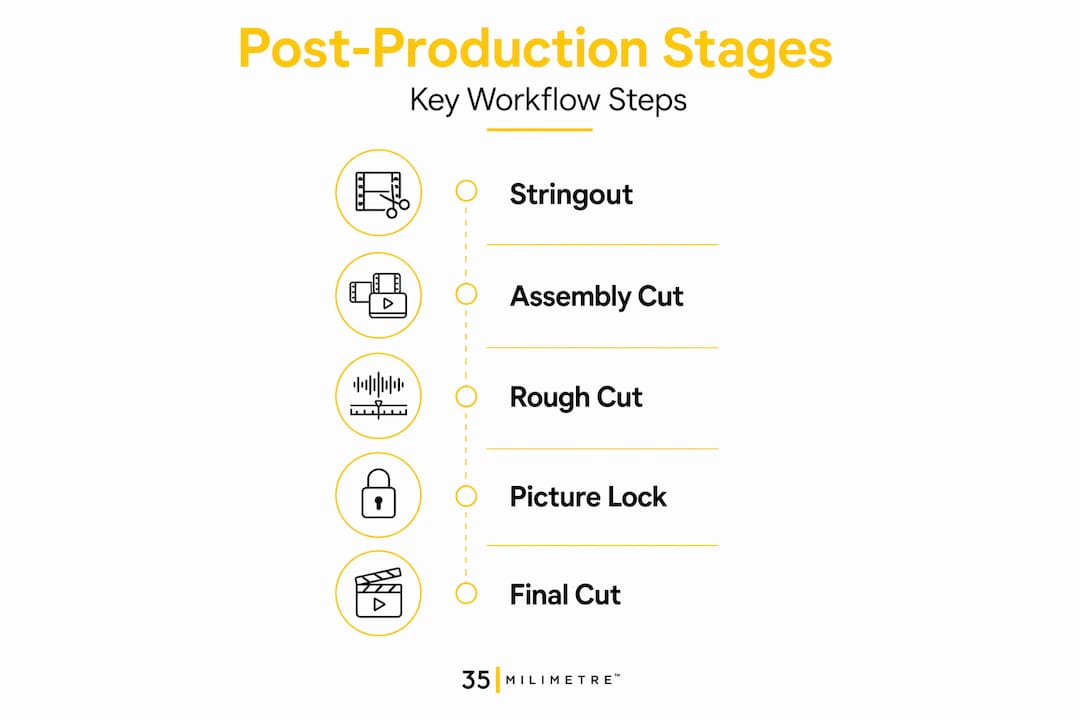
Understanding each phase of post-production as a distinct milestone, not just a vague step in a process, helps every member of a team know what they are responsible for and when.
Film editing and VFX terms you need to know
This is where post-production terminology can get dense fast, especially when visual effects vocabulary overlaps with editorial language. A few terms get used loosely and cause real confusion on set and in the edit room.
Compositing is the process of layering multiple visual elements into a single cohesive image. It might mean placing a CGI vehicle into a live-action scene or integrating a digital background behind a product shot. A matte defines which areas of an image are visible or transparent in a composite, while a mask is a tool used to isolate a specific portion of a frame, often animated to follow moving subjects.

Pixel fixing refers to the targeted correction of specific pixels or small regions in a frame, whether to remove sensor dust, fix continuity errors, or clean up distracting background elements. It is precise, often painstaking work, and the distinction between pixel fixing and full-frame retouching matters when scoping a project budget.
Iteration is a term borrowed from software development but firmly embedded in post-production workflows. When a client asks for “one more round,” they are requesting an iteration. Defining how many iterations are included in a scope of work prevents scope creep and protects both sides of a production relationship.
One of the newer additions to the visual effects vocabulary is Gaussian splatting, a rendering technique that constructs photorealistic 3D scenes from 2D photographic captures using millions of tiny, semi-transparent ellipsoids. It enables realistic set extensions and virtual camera movements without the cost of traditional 3D reconstruction. If you have not encountered this term yet, you will.
Pro Tip: When a client or director says “just clean it up a bit,” immediately clarify whether they mean pixel fixing, compositing, or full retouching. Ambiguity here translates directly into unbillable hours.
AI-assisted tools now handle logging, transcription, and rough sorting at speed, but they tend to prioritize recognizable content, which can subtly narrow the range of story possibilities an editor even sees. Knowing this limitation is part of modern post-production literacy.
Audio post-production terminology explained
Sound is half the picture, as any seasoned post supervisor will tell you. Yet audio terminology is where even experienced video editors regularly hit a wall. Getting sound design terms right is not just a technical requirement. It is a professional one.
LUFS stands for Loudness Units relative to Full Scale. It is the measurement standard used globally for broadcast and streaming audio. Streaming platforms target loudness of -23 to -24 LUFS with a True Peak maximum of -2 dBTP. Theatrical DCP delivery targets -18 to -20 LUFS with the same True Peak ceiling. Submitting a mix outside these ranges will trigger a rejection or automated normalization that destroys the dynamic intent of your mix.
True Peak is distinct from standard peak metering. It measures the actual reconstructed audio signal, including inter-sample peaks that standard meters miss. Exceeding 0 dBTP causes audible distortion in cinema projection systems. A True Peak limiter set at -2 dBTP is not optional for theatrical delivery. It is a hard requirement.
ADR stands for Automated Dialogue Replacement, though in practice nothing is automated about it. It is the process of re-recording dialogue in a controlled studio environment to replace unusable production audio. Wild track is separate audio recorded on set without picture, often used for ambience, room tone, or specific sound effects that will be layered in during the sound design phase.
Surround formats like 5.1 and 7.1 describe speaker channel configurations. DCP audio requires calibrated surround at 24-bit/48 kHz. Knowing these specs before a mix begins, not after, separates professional audio deliverables from technically flawed ones.
Pro Tip: Always check your True Peak readings in a True Peak meter, not a standard peak meter. The difference is invisible until it causes distortion in a cinema playback system.
On-set VFX data terminology and emerging workflows
One of the most significant shifts in modern post-production is the growing responsibility of the VFX department to manage critical data from pre-production all the way through final delivery. This is not just a workflow trend. It reflects a fundamental change in how productions are structured.
The 2026 Visual Effects Society On-Set VFX Data Guide maps key data sets, capture workflows, and practical applications with a clear goal: establish a shared language that reduces errors, aligns expectations, and supports cross-departmental collaboration. The guide is relevant not just to VFX teams but to directors of photography, production designers, and post supervisors.
Key terms from this emerging vocabulary include:
- LiDAR scans: Three-dimensional spatial captures of physical environments used for camera tracking, set reconstruction, and environment modeling in VFX compositing.
- Asset integrity: The verification that a captured data asset, whether a texture, scan, or tracked point cloud, is complete, correctly labeled, and usable in post without rework.
- Continuity: In VFX data terms, this goes beyond wardrobe and props. It encompasses lighting records, lens data, and positional metadata that allow digital elements to match live-action plates frame-accurately.
- Data hierarchies: The structured organization of capture files, reference imagery, and production metadata that VFX teams maintain to keep large-scale projects coherent across months of work.
On-set VFX data is a vital operational asset beyond just post-production, supporting creative decisions and enabling smoother collaboration across departments. Productions that treat it as an afterthought consistently pay for that decision in post.
“The goal is a shared operational language that reduces errors, aligns expectations, and improves cross-department communication from day one.” Visual Effects Society, On-Set VFX Data Collection and Usage Guide, 2026
How terminology mastery improves real workflows
Knowing definitions is one thing. Using terminology correctly under production pressure is what separates confident professionals from those who nod along in meetings and figure things out later. The practical value of a solid post-production glossary shows up in very specific ways.
Inadequate pre-production planning is one of the most common sources of costly post-production delays. When a director says “we’ll fix it in post” without understanding what that fix actually requires, terminology becomes a budget issue. Every term represents a real process with a real cost attached.
Here is a numbered list of practices that help teams build shared terminology fluency:
- Create a project-specific glossary. At the start of any production, document the terms specific to that project’s pipeline, including format specs, delivery requirements, and VFX terminology. This single document reduces ambiguity across departments.
- Standardize revision language. Define what “revision,” “iteration,” and “approval” mean contractually before work begins. Ambiguous language here causes the most expensive disputes.
- Cross-train between departments. Editors who understand audio terms communicate better with sound designers. VFX artists who understand color grading vocabulary make better handoffs to colorists.
- Reference published guides. Industry documents like the VES On-Set VFX Data Guide give teams a neutral, authoritative source to resolve terminology disagreements without ego.
- Review terminology as tech evolves. Tools like Gaussian splatting and AI-assisted sorting are adding new terms faster than any static glossary can track. Build regular check-ins with your team to catch new vocabulary before it creates confusion.
Consolidating feedback early and aligning on language before post begins is one of the highest-return investments a production can make. The cost of one day of rework caused by a misunderstood term is almost always greater than the time spent defining it upfront.
Pro Tip: When onboarding a new client or collaborator, send them a one-page terminology reference specific to your workflow. It signals professionalism and preempts most of the common misunderstandings before they happen.
My take on how post-production language is changing
I have been working in this industry long enough to watch entire categories of terminology appear, shift meaning, and occasionally disappear within a single decade. What I find genuinely interesting right now is the tension between how much the vocabulary is expanding and how little time most teams spend actually aligning on it.
AI tools are a clear example. At 35milimetre, we have been integrating AI-assisted workflows into our image production for the past year, and the vocabulary around it is still unsettled. “Generative fill,” “AI-enhanced compositing,” and “diffusion-based retouching” mean different things to different people depending on which tools they use. When a client asks for “AI retouching,” I need to know exactly what they think that means, because what they imagine and what the pipeline actually produces can be very different things.
What I have learned is that the professionals who struggle most are not the ones who lack technical skill. They are the ones who assume terminology is universal. A term like “final cut” means something specific in an editorial context and something entirely different to a client who just wants to see the finished video. That gap costs everyone involved.
The best post-production teams I have worked alongside share one habit: they talk about language explicitly, early, and without embarrassment about asking “what do you mean by that?” It sounds simple. In practice, it takes confidence to do it consistently.
Mastering post-production terminology is not about memorizing a post-production glossary for its own sake. It is about giving yourself and your collaborators a shared foundation to do better work, faster, with fewer costly misunderstandings along the way.
— 35mm
Work with a team that speaks the language
Whether you are delivering a DCP for theatrical release, an OTT-ready file with platform-specific loudness specs, or a composited commercial visual that demands pixel-accurate retouching, having the right expertise in your corner makes a measurable difference.

At 35milimetre, we have spent over two decades working at the intersection of visual post-production, compositing, color grading, and CGI for major brands in technology and automotive. We understand the full chain of post-production terminology because we operate inside it every day. If your next project demands professional post-production services that meet industry delivery standards from picture lock to final output, let’s talk. We bring the technical fluency and the creative precision to get your visuals where they need to go.
FAQ
What are the core stages of post-production?
The core stages follow a defined sequence: stringout, selects, assembly cut, rough cut, picture lock, and final cut. Each stage has specific deliverables and involves distinct roles including the editor, assistant editor, and post supervisor.
What does LUFS mean in audio post-production?
LUFS stands for Loudness Units relative to Full Scale, the standard measurement for audio loudness. Streaming platforms target -23 to -24 LUFS, while theatrical DCP delivery targets -18 to -20 LUFS, both with a True Peak maximum of -2 dBTP.
What is picture lock in film editing terms?
Picture lock is the editorial milestone at which the cut is officially approved and no further changes are made to the edit. After picture lock, VFX, color grading, and audio work begins in earnest, and any change triggers costly rework across all downstream departments.
What is Gaussian splatting in VFX?
Gaussian splatting is a rendering technique that creates photorealistic 3D scenes from 2D image captures using millions of semi-transparent ellipsoids. It is used for set extensions and virtual camera movements and represents one of the most significant recent additions to visual effects vocabulary.
Why does post-production terminology matter for collaboration?
Shared terminology reduces miscommunication, prevents expensive revisions, and aligns expectations across editorial, audio, and VFX departments. Productions that invest in terminology alignment early consistently complete post-production faster and with fewer costly corrections.
