
What Is Product Visualization? A Guide for Marketers

Product visualization is defined as the use of digital technology to create photorealistic or interactive representations of products, enabling marketing, design validation, and sales support before a physical item ever exists. Unlike traditional photography, which requires a finished product and a physical set, product visualization) uses 3D modeling, rendering engines, and compositing to produce images and experiences that are often indistinguishable from a real photograph. The technique spans static renders, 360-degree spins, real-time configurators, and augmented reality previews. For marketers, product designers, and business owners, understanding how to visualize products digitally is no longer optional. It is the foundation of competitive product presentation in e-commerce and beyond.
What is product visualization and how does it work?
Product visualization is the digital creation of photoreal or interactive 3D models that allow teams to view, manipulate, and present products without physical production. At its core, the process starts with a 3D model built in software like Autodesk Maya, Blender, or Cinema 4D. That model is then assigned materials and textures, placed in a virtual environment, and rendered using a lighting engine that simulates how light behaves in the real world.
The rendering method most relevant here is physically based rendering, or PBR. PBR simulates the physical interaction between light and surface materials, producing consistent, realistic results regardless of the lighting environment. A chrome finish looks like chrome under studio lighting and under daylight because the material itself carries physical properties, not just a static texture. This consistency is what separates professional product renders from amateur CGI.

Beyond static images, product visualization also supports design validation) and cross-functional collaboration. Engineering teams review geometry, marketing teams approve color and finish options, and retail partners receive channel-ready assets, all from the same 3D source file. One master model serves the entire product lifecycle, from concept approval to post-launch campaign imagery.
What are the main product visualization techniques used today?
Several distinct techniques fall under the product visualization umbrella, and the right choice depends on your channel, budget, and audience expectations.
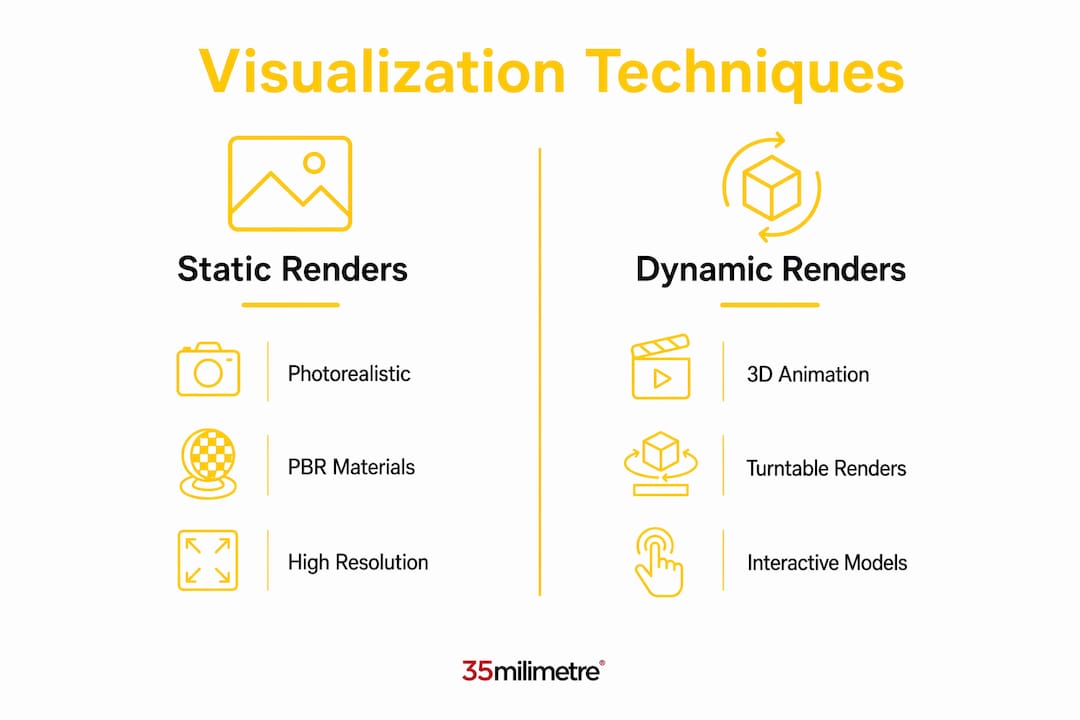
Photorealistic static rendering is the most widely used technique. A 3D artist builds a product model, applies PBR materials, and renders a high-resolution image in software like KeyShot, V-Ray, or Arnold. The output is a single still frame standing in for a physical experience, and when executed well, it is genuinely difficult to distinguish from a photograph. This technique suits catalog imagery, print advertising, and social media content.
3D animation and turntable renders extend static imagery into motion. A product rotates on a virtual turntable, or a camera moves through a scene to reveal form and detail. Automotive brands use this extensively for launch films, and consumer electronics companies use it to highlight product design before units ship.
Interactive 3D and real-time configurators represent the most engaging end of the spectrum. Real-time 3D visualization lets shoppers customize and view products instantly from any angle without page reloads, updating color, material, and configuration choices on the fly. This is the technology behind furniture configurators, sneaker builders, and automotive spec tools.
Augmented reality (AR) previews place a 3D product model into the shopper’s real environment through a smartphone camera. IKEA’s Place app is the most cited example, but the technology now appears across apparel, cosmetics, and consumer electronics.
- Photorealistic static renders: best for catalog, print, and social
- 3D animation: ideal for launch films and feature highlights
- Real-time configurators: highest engagement for customizable products
- AR previews: strongest for spatial products like furniture and home decor
Pro Tip: Build your master 3D model to the highest possible polygon count and material quality, then derive lower-resolution versions for web and AR. Starting from a high-quality asset and optimizing downward is far more efficient than rebuilding from scratch for each channel.
How does product visualization improve marketing and sales performance?
The business case for product visualization is grounded in measurable outcomes, not aesthetics. 3D and AR visualization can roughly double online conversion rates and cut product returns by approximately 40%. That return reduction alone changes the unit economics of e-commerce significantly, since returns in apparel and furniture routinely cost brands more than the original sale margin.
In furniture e-commerce specifically, interactive 3D visuals and AR can increase purchase intent by 64% and eliminate the cost of physical photo shoots entirely. A brand that previously needed to ship prototypes to a photography studio, style them, shoot them across multiple colorways, and then reshoot for seasonal campaigns can now update a material in a 3D file and re-render in hours.
“Product visualization is not simply marketing imagery. It acts as a connection from engineering and design to commerce, validating concepts before production and reducing the cost of late-stage changes.”
Customer confidence is the underlying driver of all these gains. When a shopper can rotate a product, zoom into stitching detail, or place a sofa in their living room via AR, the uncertainty that causes cart abandonment disappears. Real-time 3D visualization directly addresses buyer uncertainty by offering instant visual confirmation of customizations. That confirmation converts browsers into buyers.
Operational savings compound the revenue gains. Virtual photography replaces physical shoots for new colorways, regional market variants, and seasonal refreshes. A single 3D asset library can generate hundreds of unique images without a studio booking, a stylist, or a shipping crate.
What are practical product visualization examples across industries?
The importance of product visualization becomes clearest when you look at how specific industries apply it across the product lifecycle.
-
Furniture and home decor e-commerce. Brands like IKEA and Wayfair use 360-degree spins and AR previews to let shoppers assess scale, finish, and fit before purchase. The 3D model doubles as a design review asset internally and a consumer-facing configurator externally.
-
Consumer electronics. Apple and Samsung render product imagery months before hardware is finalized. Marketing campaigns launch with CGI that is pixel-perfect because the 3D model is built directly from engineering CAD data, ensuring dimensional accuracy.
-
Automotive. Every major manufacturer uses real-time configurators on their websites. A buyer specifies paint color, wheel design, interior trim, and upholstery, and the configurator renders the combination instantly. This is interactive 3D rendering at enterprise scale.
-
Apparel and footwear. Nike’s shoe configurator, Nike By You, lets customers design colorways on a 3D model of the shoe before ordering. The configurator handles thousands of material and color combinations without a single physical sample.
-
Packaging and FMCG. Brand managers use 3D renders to test label designs, shelf placement, and retail display configurations before committing to print runs. A packaging redesign that once required physical mockups now happens entirely in 3D, with photorealistic renders shared across design, marketing, and retail teams.
Across all of these cases, visualization supports the full product lifecycle), from concept review to post-launch content, with the same 3D assets serving multiple functions. That reuse is what makes the investment worthwhile.
How to implement product visualization effectively
Effective implementation starts with asset strategy. The most efficient approach treats 3D models as modular, channel-specific assets) that can be repurposed for static images, 360 spins, AR content, and configurators from a single source file. Workflow efficiency improves further by creating master product models and then deriving color and finish variants through material swaps rather than remodeling for each option.
Choosing the right rendering method depends on your output requirements. Offline renderers like V-Ray and Arnold produce the highest image quality but require significant compute time, making them suitable for hero imagery and print. Real-time engines like Unreal Engine and Unity sacrifice some fidelity for speed, making them the right choice for configurators and AR. Interactive configurators balance photorealism and performance by using optimized 3D assets and reusable PBR materials for instantaneous attribute updates on web and mobile.
Pro Tip: Standardize your PBR material library before production begins. Consistent material definitions across your asset library prevent the most common quality problem in product visualization: the same finish looking different across product lines because each model used a slightly different material setup.
The table below compares the two primary rendering approaches for practical decision-making.
| Approach | Best for | Trade-off |
|---|---|---|
| Offline rendering (V-Ray, Arnold) | Hero imagery, print, broadcast | High quality, slow output |
| Real-time rendering (Unreal, Unity) | Configurators, AR, interactive web | Fast output, lower peak fidelity |
| Hybrid (baked lighting, optimized PBR) | E-commerce product pages, 360 spins | Balanced quality and performance |
Common pitfalls include inconsistent material definitions across product lines, poor mesh topology that deforms under animation, and interaction design that confuses rather than guides the shopper. The last point matters more than most teams expect. A configurator with too many simultaneous options, or one that loads slowly on mobile, will reduce conversion rather than improve it. Performance optimization is as much a part of visual content creation as artistic quality.
Key takeaways
Product visualization delivers measurable commercial value when 3D assets are built to a high standard, managed as modular libraries, and deployed across the right channels with appropriate rendering methods.
| Point | Details |
|---|---|
| Core definition | Product visualization creates photoreal or interactive digital representations to support marketing, design, and sales. |
| PBR is the quality standard | Physically based rendering produces consistent, realistic material appearance across all lighting conditions and platforms. |
| Conversion and return impact | 3D and AR visualization can double conversion rates and reduce product returns by roughly 40%. |
| Modular asset strategy | Build one master 3D model and derive all channel variants through material swaps to maximize efficiency. |
| Rendering method selection | Match your renderer to your output: offline for hero imagery, real-time for configurators and AR. |
Why product visualization has changed how we think about imagery
After two decades working in post-production and visual storytelling at 35milimetre, the shift that product visualization has brought to our industry is not subtle. We used to receive physical products, build sets, light them carefully, shoot hundreds of frames, and then spend days in retouching to get a single hero image. That process is still valid for certain briefs, but it is no longer the default.
What we have seen, particularly in the last three years, is that the brands doing this best are not treating visualization as a replacement for photography. They are treating it as a parallel production pipeline. The 3D model exists alongside the physical product, and each serves a different purpose. The render handles e-commerce, configurators, and pre-launch campaigns. The photograph handles lifestyle, editorial, and brand storytelling where human presence and real-world texture matter.
The brands that struggle are the ones that try to use visualization for everything or photography for everything. The 3D artists elevating advertising we admire most are the ones who understand when CGI serves the brief and when it does not. That judgment is a craft skill, not a software skill.
What concerns us slightly is the race toward AI-generated product imagery. The tools are genuinely impressive, and we use them ourselves. But AI generation currently lacks the dimensional accuracy and material consistency that a properly built 3D model provides. For a brand where a 2mm dimensional error or a slightly wrong gloss level would cause a return, AI generation is not yet a substitute for structured visualization. It is a complement, particularly for lifestyle backgrounds and scene generation around a properly rendered product.
The future we are watching closely is real-time rendering quality reaching parity with offline rendering. When that happens, the distinction between a configurator and a hero image disappears, and the entire product presentation pipeline collapses into a single real-time asset. We are not there yet, but the gap is closing faster than most people in traditional post-production realize.
— 35mm
Take your product visuals further with 35milimetre
Strong product visualization starts with strong assets, and strong assets often need expert post-production to reach their full potential. At 35milimetre, we work with brands, ad agencies, and product teams to refine 3D renders, composite product imagery into campaign environments, and deliver marketplace-ready visuals that perform across every channel. Whether you need retouching on existing renders, full compositing for a campaign, or color grading that keeps your product looking consistent from e-commerce thumbnail to billboard, our team handles it. We have spent over two decades making product imagery work harder for the brands behind it. If your visualization assets are not converting the way they should, reach out to 35milimetre and let us take a look.
FAQ
What is product visualization in simple terms?
Product visualization is the creation of digital images or interactive models of a product using 3D software, allowing brands to present, market, and validate products without physical production.
How does product visualization differ from product photography?
Product photography captures a physical object with a camera, while product visualization generates imagery entirely in software. Visualization offers greater flexibility for colorways, configurations, and pre-production assets.
What industries benefit most from product visualization?
Furniture, consumer electronics, automotive, apparel, and packaging all rely heavily on product visualization. These industries share the need to present multiple variants and configurations without producing physical samples for every option.
Does product visualization actually reduce product returns?
Yes. 3D and AR visualization reduces product returns by approximately 40% by giving shoppers a more accurate understanding of what they are buying, which reduces the gap between expectation and reality.
What software is used for product visualization?
Common tools include Blender, Autodesk Maya, Cinema 4D, KeyShot, V-Ray, Arnold, Unreal Engine, and Unity. The right choice depends on whether you need offline rendering quality or real-time interactivity for configurators and AR applications.
