
Build an efficient visual content workflow for startups

Startup marketing teams move fast, but speed without structure becomes expensive. When visual content production lacks clearly defined steps, ownership, and approval gates, projects stall in endless revision loops, brand guidelines get ignored under deadline pressure, and the final output rarely matches the original brief. If your team has ever asked “who’s reviewing this?” or sent a half-finished asset to a client by mistake, you already know the cost. This article walks you through a practical, step-by-step visual content workflow built specifically for technology and automotive startups that need consistency, speed, and accountability baked into every project.
Table of Contents
- Why startups need a visual content workflow
- What you need to build an effective workflow
- Step-by-step: Startup visual content workflow
- Troubleshooting workflow bottlenecks and mistakes
- How to verify workflow results and optimize over time
- Our perspective: Treat your workflow as a compounding system, not a static checklist
- Need expert support for your startup’s visual content workflow?
- Frequently asked questions
Key Takeaways
| Point | Details |
|---|---|
| Define roles and stages | Clarifying responsibilities and step order prevents delays and confusion for startup teams. |
| Set revision limits | Limiting the number of revision rounds and requiring final approval speeds up content delivery. |
| Add compliance checkpoints | Designing explicit compliance gates reduces risk for tech and automotive brands. |
| Monitor and improve | Tracking results and soliciting team feedback enable ongoing workflow optimization. |
| Balance automation and agility | Use automation where it helps, but retain flexible systems for a lean, competitive edge. |
Why startups need a visual content workflow
Fast-moving startups tend to treat visual content production as something that just happens. A brief lands in someone’s inbox, a designer starts working, feedback arrives from three different people over two weeks, and somewhere in the middle the original direction gets lost. This pattern is not unique to any one team. It is the predictable result of building without structure.
The most common failure points we see are owner ambiguity, excessive revision loops, and missing approval gates. Owner ambiguity means nobody is clearly responsible for a given step, so tasks either stall or get duplicated. Revision loops grow out of control when there is no limit on feedback rounds, which is how a simple product image ends up going through seven drafts before anyone is satisfied. Missing approval gates mean that content reaches clients or goes live without passing through the right eyes first.
A visual workflow diagram makes sequence, ownership, and decision points explicit, which is exactly what high-velocity teams need. When the process is mapped visually, every team member can see where their responsibility starts and stops, where decisions get made, and who needs to sign off before work moves forward.
Our guides to boost engagement reinforce this point: brands that consistently produce strong visual content are almost always the ones with repeatable, structured production systems behind them.
“A workflow without defined approval gates is just a list of tasks. The approval gate is what turns creative production into a reliable, accountable process.”
The stakes for startups are real. Every extra revision round burns budget. Every missed brand checkpoint weakens visual consistency across campaigns. Every unclear handoff risks a delay that pushes a product launch back by days. A structured workflow is not bureaucracy. It is the thing that lets a small team produce at a level that looks and feels like a much larger operation.

What you need to build an effective workflow
Before you draw a single flowchart, you need the right foundations. This means knowing who fills each role, what tools they will use, and what governance rules apply to your industry.
The table below outlines the core elements for both tech and automotive startup workflows.
| Element | Tech startups | Automotive startups |
|---|---|---|
| Content lead | Owns briefs, manages timelines | Owns briefs, manages compliance requirements |
| Designer | Produces visual assets, 2D and 3D | Produces renders, CGI, and lifestyle imagery |
| Reviewer/approver | Internal creative director or founder | Legal, brand, and technical compliance reviewer |
| Project management tool | Asana, Monday.com, or Notion | Same, with compliance tracking added |
| Asset library | Shared cloud folder with naming conventions | Centralized DAM with version control |
| Feedback channel | Dedicated Slack channel or Frame.io | Frame.io or equivalent with timestamped comments |
Automotive content process mapping goes a step further, recommending that teams map current inputs, steps, and outputs, then design decision logic and add testing and monitoring for robust automation. That approach applies directly to startups building repeatable production pipelines, not just one-off campaigns.
The setup items that matter most before your first workflow run include a documented workflow template, a single designated feedback channel, a shared asset storage system, clear naming conventions, and a governance policy that defines who has final approval authority.
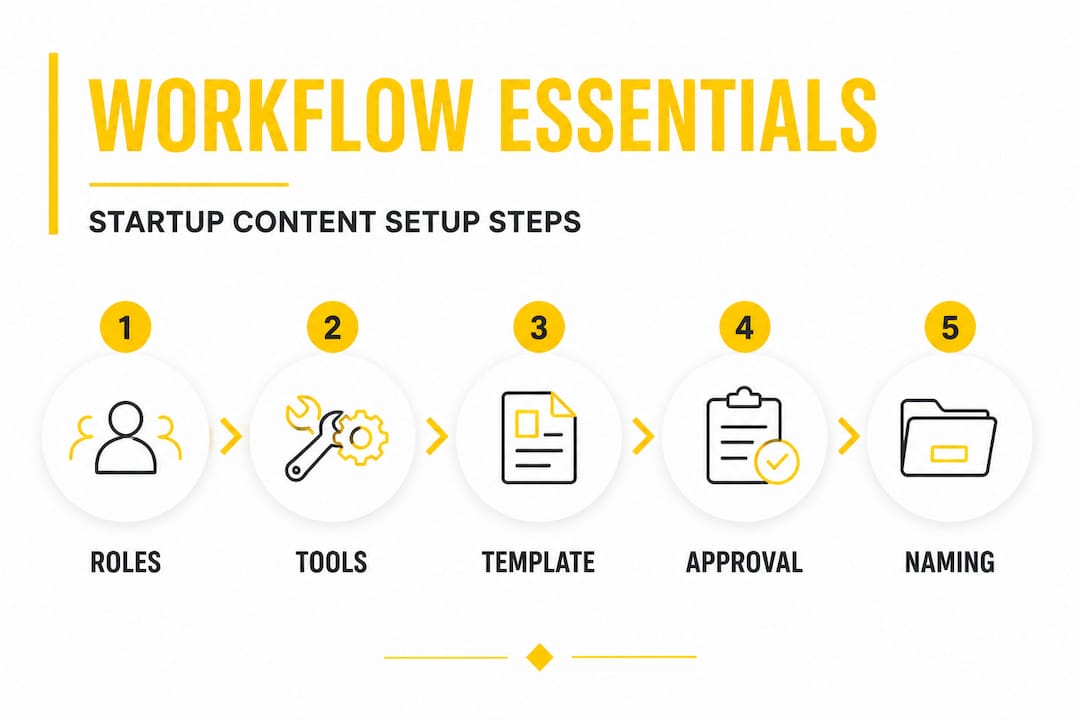
Pro Tip: Establish file naming conventions before your first project, not after. A format like [ClientCode][AssetType][Version]_[Date] takes about five minutes to agree on and saves hours of confusion later. Access controls matter equally. Not everyone needs edit permissions on every file.
Building a high-efficiency workflow means getting these foundations right before you start. And understanding what counts as an essential workflow asset for your team helps you avoid gaps mid-production.
Step-by-step: Startup visual content workflow
With the right tools and roles in place, here is a practical execution framework you can adapt to your team’s size and sector.
-
Intake and brief. Every project starts with a written brief that defines the deliverable, the format, the brand guidelines to follow, the deadline, and the intended platform or use case. No brief, no start. This single rule eliminates a large proportion of downstream confusion.
-
Assignment. The content lead assigns the project to the relevant designer or production artist, confirms availability, and sets a production deadline. This step should be recorded in your project management tool, not in a chat message that will scroll away.
-
Design and production. The designer or post-production artist creates the asset according to the brief. This is where compositing, color grading, 3D rendering, or CGI work happens. The production phase should not involve external feedback. Keep outside input out until this stage is complete.
-
Internal review. A designated internal reviewer checks the asset against the brief, brand guidelines, and any sector-specific compliance requirements. Comments are logged in one place, not scattered across email and chat.
-
Client or stakeholder review. The asset goes to the client or internal stakeholder with a clear brief of what feedback is needed and by when. This is not an open-ended conversation. The reviewer responds to specific questions.
-
Revisions (limited rounds). Establishing revision rounds with a hard limit and recorded final approvals is standard practice in professional production environments. We recommend a maximum of two revision rounds for most visual assets. If more changes are needed after that, it usually signals a brief problem, not a design problem.
-
Approval. Final approval is a formal recorded action, not a casual thumbs-up in chat. The approver signs off on the specific file version, with a timestamp.
-
Delivery. The final asset is exported in the required format, added to the asset library with correct naming, and delivered to the destination platform or client.
The table below compares a lean manual workflow with an automated workflow for startups with more complex compliance needs.
| Factor | Lean no-code workflow | Automated workflow with compliance gates |
|---|---|---|
| Setup time | 1 to 2 days | 1 to 3 weeks |
| Best for | Early-stage startups, small teams | Automotive, regulated industries |
| Flexibility | High, easy to adjust | Moderate, changes require configuration |
| Compliance control | Manual checks by reviewer | Automated checkpoints in the system |
| Revision tracking | Manual version logs | Automatic version history |
| Cost | Low | Medium to high |
Pro Tip: Build a shared visual workflow diagram and pin it somewhere every team member sees daily. A one-page flowchart showing who does what, at what stage, and who approves eliminates the “I thought you were handling that” conversations entirely.
Our strategy tips for engaging visuals and insights into brand video post-production both speak to the same principle: great-looking content is produced by disciplined processes, not inspiration alone.
Troubleshooting workflow bottlenecks and mistakes
Even a well-built workflow will run into problems. The most common ones are predictable, and knowing them in advance is more than half the battle.
The top mistakes teams make include allowing unlimited revision rounds, leaving stakeholder roles undefined, and skipping compliance or brand checkpoints under time pressure. Each of these has a compounding effect. One missed checkpoint can mean a product image goes live with incorrect safety labeling in an automotive campaign, or a tech brand’s asset goes out with the wrong typography. Those errors cost far more to fix after delivery than to catch in the workflow.
Edge cases and uncontrolled revisions often trace back to ambiguous final approval and the absence of an audit trail. The fix is straightforward: require clear revision limits and maintain documented records of every approval action.
“In regulated sectors like automotive, a missing compliance checkpoint is not just a brand problem. It can be a legal one. Governance is not optional.”
Prevention comes down to a few consistent practices. Document every decision point in the workflow, not just the tasks. Time-stamp all approvals, even informal ones, so there is always a record of when a version was accepted. Schedule a brief workflow audit every quarter to identify steps that are creating repeated friction. And assign one person to own the workflow document itself, so it actually gets updated when the process changes.
For teams looking at innovative workflow techniques across consumer-facing industries, the lesson is consistent: the bottlenecks that slow production are almost always process failures, not creative ones.
How to verify workflow results and optimize over time
A workflow that never gets measured never gets better. Once your system is running, you need a small set of key performance indicators that tell you whether it is working.
The KPIs worth tracking are turnaround time per asset type, approval velocity (how many rounds before final sign-off), compliance check pass rate, and stakeholder satisfaction score collected after each project. Turnaround time reveals where the process slows down. Approval velocity tells you whether revision limits are being respected. Compliance pass rate is non-negotiable for automotive teams. Stakeholder satisfaction closes the loop on whether the output is actually meeting business goals.
Monitoring completion rates and processing outcomes is what keeps a workflow efficient after launch, not just during the initial build. This is a point many teams miss. They build the workflow, run a few projects through it, and then let it drift as new team members join or project types shift.
Pro Tip: Set a recurring 30-minute team check-in every month to review one workflow metric together. Looking at turnaround time as a team creates shared accountability and surfaces problems before they become habits.
Collecting team feedback is equally important. A simple, anonymous form asking two questions, “What slowed you down this month?” and “What worked well?”, gives you enough signal to make meaningful improvements. Combine that with your metric data and you have a continuous improvement loop that compounds over time.
Staying current with visual content trends also feeds into workflow planning, because new asset formats and platform requirements change what your production pipeline needs to accommodate.
Our perspective: Treat your workflow as a compounding system, not a static checklist
Most teams build a workflow once, use it for six months, and then quietly stop following it as the team grows or the project mix changes. That is where the conventional approach falls short. A workflow is not a checklist you complete and file away. It is a system that gets smarter every time you run a project through it, if you let it.
The real competitive advantage for a small startup is not having more automation. It is having a tighter feedback loop than larger, slower competitors. Lean, disciplined workflow planning enables even a small team to outcompete bloated production setups that rely on headcount rather than process quality.
We have seen this firsthand at 35milimetre. A team of three can consistently produce work that matches or exceeds what larger studios deliver, because the process removes waste at every step. Batching similar asset types together, creating reusable templates for recurring formats, and building feedback rounds into the schedule rather than reacting to them as emergencies, all of these behaviors compound over time into a measurable production advantage.
The uncomfortable truth about automation is this: more tools do not automatically mean more speed. An over-automated workflow that nobody follows because it is too rigid will consistently underperform a simpler, well-maintained system that the team actually trusts and uses.
Our creative storytelling workflow reflects the same philosophy. The workflow exists to serve the creative work, not the other way around. When both are aligned, even a startup with a lean team can produce visual content at a level that builds genuine brand equity.
Need expert support for your startup’s visual content workflow?
Knowing what a strong visual content workflow looks like is one thing. Building and running one while managing a product launch, a growing team, and shifting campaign needs is another challenge entirely.

At 35milimetre, we work directly with technology and automotive startups to produce high-end visual content within structured, efficient production pipelines. From CGI and compositing to AI-enhanced imagery and brand video post-production, we bring two decades of hands-on production experience to every project. Whether you need a trusted production partner to handle the creative execution or a more collaborative setup where we work alongside your team, our visual post-production experts are ready to help you build a workflow that actually scales. Reach out to discuss your next project.
Frequently asked questions
What roles are essential for a startup visual content workflow?
At minimum, you need a content lead, designer, and a reviewer with clear approval authority. A practical workflow explicitly defines sequence, ownership, and decision points for each of these roles.
How can startups prevent uncontrolled revision cycles in their workflow?
Set explicit limits on revision rounds and require auditable final approvals for each asset version. Explicit revision-round limits and a formal approval action create a clear, auditable record that protects both the team and the client.
What’s the difference between a lean workflow and an automated workflow?
A lean workflow relies on clear manual systems and human accountability, while automated workflows integrate technology for decision logic and compliance gates. The right choice depends on your team size, budget, and compliance requirements.
How can automotive startups ensure brand compliance in visual content?
Incorporate compliance checkpoints and governance controls directly into the workflow to prevent off-brand or non-compliant visuals from advancing. Governance and approval gates are workflow-critical in automotive content production.
What KPIs should you track to optimize your workflow?
Track turnaround time, number of approval cycles, compliance pass rate, and team satisfaction for ongoing improvements. Monitoring completion rates and processing outcomes keeps the workflow efficient well after the initial launch.
